






Say you shipped auto-scheduling on a Tuesday. It builds next week’s staff rota based on everyone’s availability, and the in-app rating you attached to it comes back looking fine. Mostly fours, a few fives.
Then you read the comments. “I only found it because my manager sent a screenshot.” “It put two people on the same Saturday shift, so I redid the week by hand.” Satisfied users, on paper, who can’t find the feature and don’t trust what it makes.
The rating wasn’t wrong. It answered the question you asked. Launch week needed different ones: how did you find this, and what did you expect it to do? The right product survey question depends on the moment, so this bank is organized that way: 45 questions from concept test to cancellation, plus four templates to copy.
Key Takeaways
- Group product survey questions by moment (concept, beta, launch, adoption, pricing, churn), not by topic.
- In launch week, ask about discovery and expectations before satisfaction. A good rating can hide a feature nobody finds.
- Ask about the last time something happened, and keep in-app surveys to one question plus a follow-up or two.
- Tag open answers by moment and feature, route them to the owning team, and tell respondents what changed.
What a product feedback survey is for (and what it isn’t)
A product feedback survey asks users about the product itself: a feature, a flow, a price, a decision to leave. Its job is telling the people who build it what to change next.
It isn’t a relationship survey: NPS (Net Promoter Score) tells you how an account feels overall and rarely points at the screen that needs fixing. It isn’t onboarding either, which has its own milestones and its own onboarding questions. And ranking the entire roadmap is a voice-of-customer job, covered further down.
Most product people say they’re short on customer contact. In Product Focus’s 2026 Survey of the Product Management Profession, 71% of 677 product professionals, mostly in Europe and surveyed in late 2025, said they don’t spend enough time with customers or understanding the market. A two-question survey won’t replace interviews, but it reaches users at the exact points where the product changed under them.
Match the question to the product moment
Six moments, six different jobs:
| Moment | What you’re learning | Best format | Channel |
|---|---|---|---|
| Concept, pre-launch | Is the problem real? How is it solved today? | Open text, multiple choice | Email to a segment |
| Beta, early access | Can people finish the task? What breaks? | Task success, CES, open text | Email or in-app |
| Launch week | Did people find it? Did it meet expectations? | Multiple choice, CES, trust rating | In-app, after first use |
| Adoption (30+ days) | Is it a habit? Where do people stop? | Counts, multiple choice | In-app, on the feature |
| Pricing, packaging | Does price match value? What drives upgrades? | Rating scales | Email to affected accounts |
| Churn, downgrade | What did the product fail to do? | Multiple choice, one or two open questions | Cancel flow |
A CES (Customer Effort Score) item reads the effort of a task just done; an open question finds what you didn’t think to ask. The full catalog of survey question types covers when each format fits.
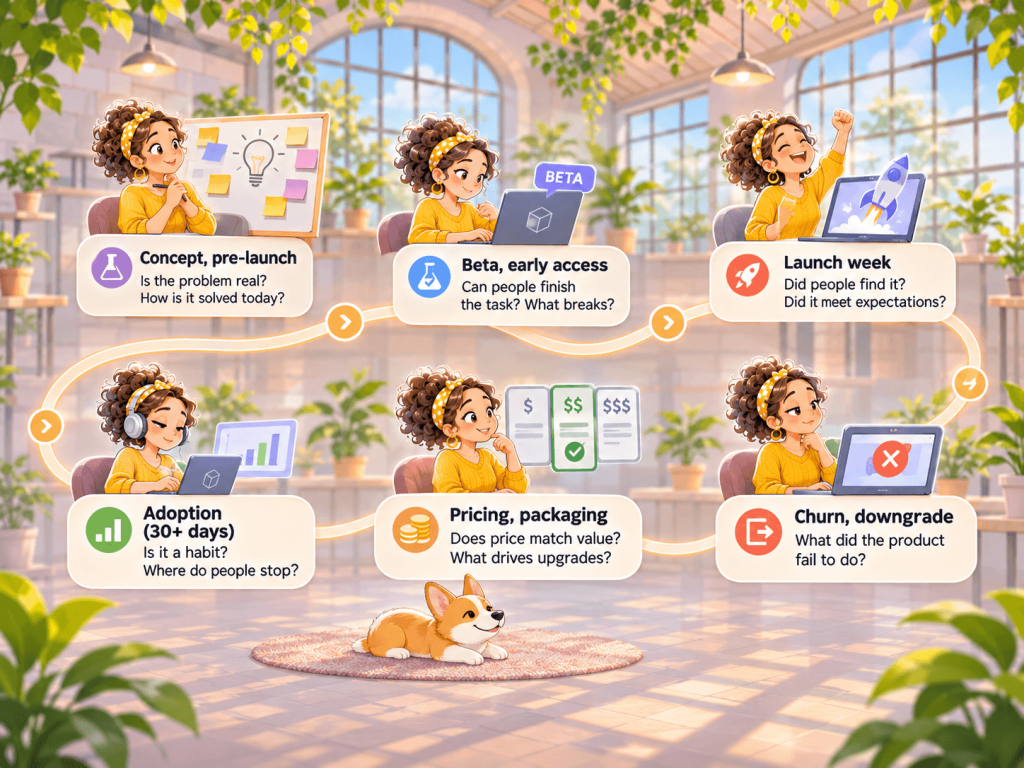
The sections below take each moment in turn, with an example product and the questions to ask. Jump to the moment you’re in.
Concept and pre-launch questions
Nothing exists yet, so users can only describe their current life. Our example is a self-serve booking page where a business’s customers pick their own slot. These new product survey questions test the problem first, the idea second.
- The last time a customer booked an appointment with you, how did it happen? (open)
- How much of a problem is booking for your team today? (1-5)
- What do you use to handle bookings right now? (Phone and calendar / Spreadsheet / Another tool / Someone does it by hand)
- Here’s a short description of the booking page. What would you expect it to do first? (open)
- Which part of this description matters most to you? (one option per element of the concept)
- What would stop you from moving your bookings to something like this? (Setup time / Cost / Trust / Team adoption / Other)
- If this were a paid add-on, which monthly price would feel reasonable? (three or four price bands)
Teams skip question 4 and regret it: what people expect a concept to do first is what your launch message has to say. Once there’s a mockup to react to, switch to first-impression questions.
Beta and early-access questions
Beta users are the most forgiving people you’ll survey. They opted in and will rate a half-working feature generously, so ask about tasks. The example: a rebuilt page editor in early access.
- What were you trying to do the last time you opened the new editor? (open)
- Did you manage to finish it? (Yes / Partly / No)
- How did the result compare to what you expected? (Much worse to Much better, 5 points)
- What broke, or felt broken, while you were using it? (open)
- How easy was it to get that done in the new editor? (CES, 1-7)
- If we released the editor exactly as it is today, would you keep using it? (Yes / Only if something gets fixed / No, I’d switch back)
- What has to be in place before you’d move your whole team to it? (open)
“Only if something gets fixed” is a normal answer to question 13 in a healthy beta. Question 14 names the something: that’s your list for general availability.
Template 1: Beta feedback survey
Send it when: a beta user attempted a real task in the feature.
Did you manage to finish what you were trying to do? ◯ Yes ◯ Partly ◯ No
How easy was it to get that done? 1-7 (1 = very difficult, 7 = very easy)
How did the result compare to what you expected? ◯ Worse ◯ About what I expected ◯ Better
If we released it exactly as it is today, would you keep using it? ◯ Yes ◯ Only if something gets fixed ◯ No, I’d switch back
What has to be in place before you’d roll it out to your team? [ your answer ]
Launch-week and post-launch questions
Back to the auto-scheduler. In launch week, three things come before satisfaction: did people find the feature, what did they expect, and do they trust its output? These post-launch survey questions use the scheduler as the example.
- How did you find out about auto-scheduling? (In-app message / Email / A teammate / Came across it / First I’ve heard of it)
- Before you tried it, what did you expect it to do? (open)
- How easy was it to get your first rota out of it? (CES, 1-7)
- How much do you trust the rota it built? (1-5)
- What did you change by hand before you used it? (open)
- Did it do what you needed? (Yes / Partly / No)
- What made you hesitate before trying it, if anything? (open)
Questions 16 and 18 would have caught the opening scenario on day one. One exposes the gap between your announcement and the user’s mental model. The other catches output people quietly fix by hand.
Template 2: Feature launch pulse (in-app, 3 questions)
Send it when: the user finishes with the new feature for the first time. Show the first question alone; the rest only to people who answer it.
How easy was it to get what you needed from [feature]? 1-7 (1 = very difficult, 7 = very easy)
How much do you trust the result? 1-5 (1 = not at all, 5 = completely)
Before you tried it, what did you expect it to do? [ your answer ]
Feature adoption and usability questions
Thirty days in, the novelty is gone. A feature still in use is a habit; one that isn’t was a demo. The example: a scheduled export that drops a file into a shared folder weekly.
- In the last two weeks, how many times did you use scheduled exports? (None / Once / 2-5 / More than 5)
- When you don’t use it, what do you do instead? (Export by hand / Ask a colleague / Another tool / Don’t need the data that often)
- The last time you didn’t finish setting up an export, where did you stop? (one option per setup step / Never stopped partway)
- How confident are you that the file has everything you need? (1-5)
- Now that you’ve had it a while, how easy is the export flow to use? (CES, 1-7)
- Which step takes longer than it should? (open)
- Who else on your team uses it? (Just me / One or two others / Most of the team / Not sure)
- What do you do with the file once it arrives? (open)
Question 22 asks for a count over a fixed window, because people overstate habits when they pick a frequency. Question 29 is the sleeper: what happens to the file after it lands often shows the next feature better than a request list.
To have customers rank what to build next, use VoC survey questions instead. They’re built for trade-offs across the whole base.
Pricing and packaging questions
Pricing feedback is touchy, so tie each question to something users experience: a bill, a limit, a plan feature. Our example is a move to a usage-based tier.
- How well does what you pay match the value you get? (1-5)
- Which part of your plan would you miss most if it went away? (one option per plan element)
- How easy is it to predict next month’s bill? (1-5)
- Since the move to usage-based pricing, what’s changed about how you use the product? (Nothing / Use it less / Use it more / Moved some work elsewhere / Reconsidering it)
- What would make you move up to the next plan? (open)
- How fair does the new pricing feel for the way your team uses the product? (1-5)
Watch question 33 after any pricing change, because “use it less” rarely shows up in revenue until renewal. Question 32 matters for usage-based pricing: when the bill is unpredictable, heavy users start rationing.
Template 3: Pricing-change survey
Send it when: an account has completed one full billing cycle under the new pricing. Email the admin or billing contact.
How fair does the new pricing feel for the way your team uses the product? 1-5 (1 = very unfair, 5 = very fair)
How easy is it to predict next month’s bill? 1-5 (1 = impossible, 5 = very easy)
Since the change, what’s different about how you use the product? ◯ Nothing ◯ Use it less ◯ Use it more ◯ Moved some work elsewhere ◯ Reconsidering it
What would make you move up to the next plan? [ your answer ]
Churn, downgrade, and offboarding questions
Most exit surveys accept “too expensive” as the answer. For a product team it’s a starting point, since price is often what people say about a product that stopped doing enough. These questions push toward the product reason.
- What’s the main product reason you’re leaving? (Missing something we needed / Too hard to use / Didn’t trust the results / Too expensive for our usage / Stopped needing it / Other)
- What were you trying to do that the product couldn’t? (open)
- What are you moving to? (Another tool / Building it ourselves / Spreadsheets or manual work / Nothing)
- What does the new option do that we don’t? (open, only for “Another tool”)
- When did you first start thinking about leaving? (After a recent change / In the first month / A few months ago / At renewal)
- What one change would have kept you? (open)
Question 40 is underrated. “After a recent change” points at a release or pricing move, and gives the team a date to check.
Template 4: Cancellation product survey
Send it when: the user confirms a cancellation or downgrade, inside the cancel flow. For downgrades, swap “leaving” for “moving to a smaller plan.”
What’s the main product reason you’re leaving? ◯ Missing something we needed ◯ Too hard to use ◯ Didn’t trust the results ◯ Too expensive for our usage ◯ Stopped needing it ◯ Other
What were you trying to do that the product couldn’t? [ your answer ]
What are you moving to? ◯ Another tool ◯ Building it ourselves ◯ Spreadsheets or manual work ◯ Nothing
What one change would have kept you? [ your answer ]
The ongoing check: two questions worth asking every quarter
Once a quarter, check the whole product with two core questions (42 and 43) and two follow-ups. Keep the wording fixed so the trend means something.
- How would you feel if you could no longer use [product]? (Very disappointed / Somewhat disappointed / Not disappointed)
- How likely are you to recommend [product] to a colleague? (0-10)
- Which part of the product does most of the work behind that score? (one option per core feature)
- What’s the one thing in the product that annoys you most often? (open)
Question 42 is Sean Ellis’s product-market fit question: his benchmark is 40% or more answering “very disappointed.” The full product-market fit survey has its own guide. Questions 44 and 45 aim the NPS score at the product.
Where and when to ask product questions
Timing does most of the work. A question asked seconds after someone runs the new export beats the same question by email three days later.
In-app also gets more answers, though by less than the figures you’ll see quoted. Across Retently accounts over the 12 months to July 2026, the typical account’s in-app survey was answered on 9.3% of triggers, compared with 5.0% of email sends. The in-app median rests on a small sample, so treat it as directional. Roughly twice email, then, and nowhere near the 25-50% in-app rates that circulate without a source.
Email still reaches people who haven’t logged in for weeks, which matters for pricing and churn. In-app is for the moment itself, with four rules:
- Fire it from the action. Your app shows it right after the first finished export or saved rota.
- Target by what you know. Ask people who used the feature, are on the relevant plan, or have been around long enough to have an opinion.
- Leave a quiet period. Thirty days between surveys for the same person is a sensible default.
- Start with one question. Show follow-ups only to people who answered.
That’s close to how Retently’s in-app survey works. Your app identifies the user and calls the survey when the moment happens. Who’s eligible comes down to attribute filters on the contact (equals, contains, greater or less than, “more than X days ago”), a delay for new contacts, recurrence, a daily cap, and a throttle that defaults to 30 days. The pop-up can be limited to specific pages, and the separate Feedback Button tab has include and exclude page rules and works for anonymous visitors. More on frequency and placement: in-app survey timing.
Write them so the answers are usable
Good product questions are boring in a specific way: concrete, narrow, and about something that already happened.
Ask about the last time, not “usually.” “The last time you exported data, what did you do with it?” gets a real story; “how do you usually use exports?” gets an idealized one.
Name the feature the way users do. If your team says “Rota Engine” and customers say “the scheduler,” so do you.
One feature per question. Nobody can honestly rate “the editor and the export flow” if they love one and hate the other.
Label both ends of every scale. The “(1-5)” ranges above are shorthand, so spell out what 1 and 5 mean (for example, 1 = not at all, 5 = completely) when you build them.
Skip a bare “would you use this?” Almost everyone says yes to a hypothetical. The broader craft of writing good questions has its own guide.
What to do with the answers
The open-text column is where a product survey lives or dies. Three habits keep it useful.
Tag every open answer by moment and by feature. “Didn’t trust the results” means one thing in launch week, another in a cancel flow.
Route each tag to the team that owns it. Scheduler trust goes to the scheduler team, billing confusion to whoever owns pricing. To turn recurring themes into prioritized work, see how to feed feedback into the roadmap.
Then close the loop. When the scheduler stops double-booking Saturdays, tell the users who reported it. That one message is why they’ll answer the next survey.
Pick the moment, then the question
The auto-scheduling launch didn’t need more questions, just different ones at the right time. Work out which moment your user is in, take the questions that fit it, and ask as close to that moment as you can.
Retently runs in-app surveys and an always-available feedback button alongside email, so product questions can go out at the moment they’re about. Start a free trial to try it on your next launch, or book a demo to walk through the setup with us.
Frequently Asked Questions
What are good survey questions for a product? Good product survey questions are tied to a moment. Before launch, ask how people solve the problem today. In beta, ask whether they finished the task. In launch week, ask how they found the feature and what they expected. After a month, ask how often they used it. At cancellation, ask what the product couldn’t do.
How many questions should a product feedback survey have? For in-app surveys, one question, with one or two follow-ups shown only to people who answer it. For email surveys to a segment, three to six questions is a workable ceiling. Every extra question costs completions, so cut anything you won’t act on.
What’s the difference between a product survey and a customer satisfaction survey? A product survey asks about specific parts of the product: a feature, a flow, a price, a reason for leaving. A customer satisfaction (CSAT) survey measures satisfaction with an interaction, often a support ticket or purchase. They overlap when you rate a feature, but product surveys aim at what to build or fix next.
When should you send a product feedback survey? Right after the moment you want to learn about: someone’s first use of a new feature, a finished beta task, a full billing cycle on new pricing, or a cancellation. In-app surveys fired by that action get sharper answers than an email days later. Leave each person a quiet period of around 30 days between surveys.
What should a new product survey include? Cover the problem before the product: when the person last ran into it, how they solve it today, and how big a problem it is. Then show a short concept description and ask what they’d expect it to do first, which part matters most, what would stop them switching, and what price band feels reasonable.

 Alex Bitca


 Christina Sol




 Greg Raileanu