



A ranking question is the one survey format that won’t let a customer say everything matters.
Ask people to rate five improvements on a 1-5 scale and nothing stops them from giving all five a top score. Ask them to order the same five and something has to come last. That forced trade-off is what a survey ranking buys you. The price is effort, for the respondent and for whoever reads the results.
Below are the formats, when a rating scale beats a ranking, 18 examples for ecommerce and B2B teams, and a worked scoring table where two sensible methods crown different winners. If you’re still choosing formats in general, start with the main types of survey questions.
Key Takeaways
- Ranking forces the trade-offs a rating scale lets respondents dodge: only one item can be number one.
- Effort climbs fast. Ten items imply 45 pairwise comparisons, so keep lists to five to seven or switch to top-N.
- Choose your scoring method before you look. Mean rank and first-place share can name different winners.
- A ranking tells you order, not distance or intensity.
- Run ranking as an occasional research question next to your always-on CX metrics.
What is a ranking question?
A ranking question asks respondents to put a set of options in order, usually from most to least important. Here’s one as a customer would see it:
Drag to rank what you’d want from us next (1 = most wanted): ⇅ 1. A mobile app ⇅ 2. A Shopify integration ⇅ 3. Bulk export to CSV ⇅ 4. Custom report templates
What comes back is ordinal data: this person prefers the app to the integration, but you don’t learn by how much. Someone who cares only about item one answers exactly like someone torn between the top two.
If all you need is a single favorite, a single-select question is lighter (see our guide to multiple-choice and checkbox questions). If you need to know how strongly people feel, you need a rating. Ranking earns its place when the honest question is “which one first?”
Types of ranking questions
Six formats cover almost everything, and they differ mostly in effort and in what the data can carry.
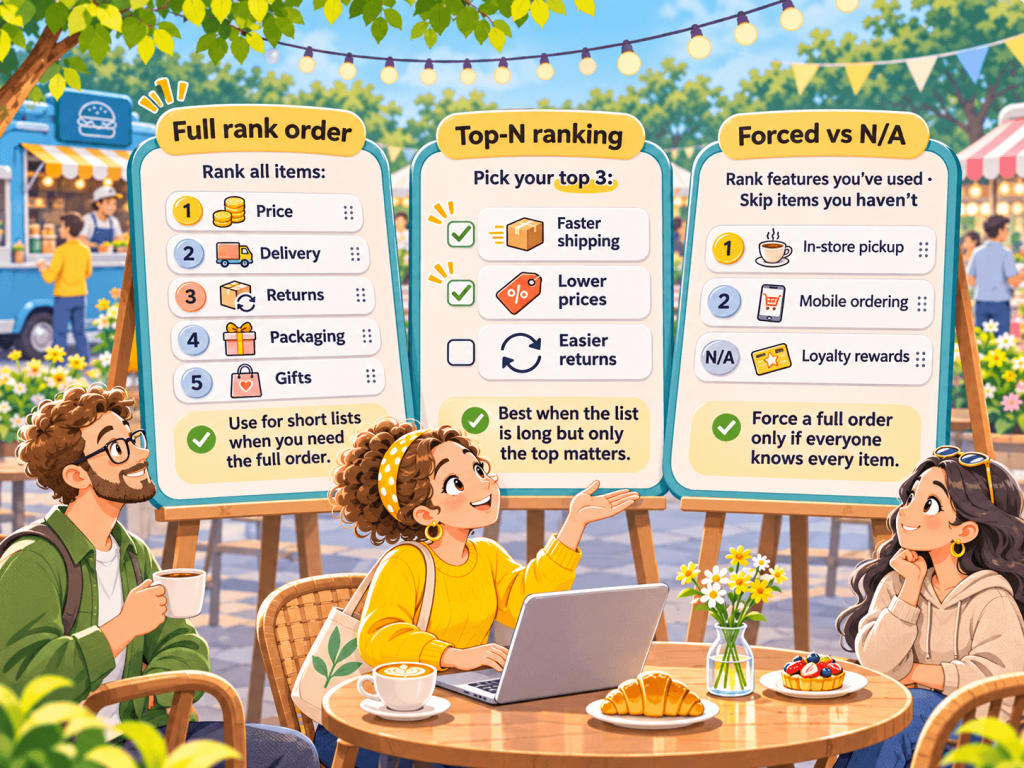
Full rank order
Every item gets a unique position, by drag-and-drop or a numbered box. Same data either way.
Number these from 1 (most important) to 5 (least important): [ 2 ] Delivery speed [ 1 ] Price [ 4 ] Packaging [ 3 ] Return policy [ 5 ] Gift options
Use it for short lists where you need the whole order, and try drag-and-drop on a real phone first.
Top-N (partial) ranking
People pick their favorites from a longer list and rank only those.
Pick your top 3 and rank them: ⇅ 1. ___ ⇅ 2. ___ ⇅ 3. ___ (Faster shipping · Lower prices · More sizes · Loyalty rewards · Live chat · Easier returns · Bundles · Gift cards)
Use it when the list is long but only the top matters. You lose the bottom of the order, usually the least reliable part anyway.
Forced ranking vs. allowing “not applicable”
A forced ranking won’t submit until every item has a slot, so you get complete data plus some invented answers. A customer who’s never contacted support still has to place “support response time” somewhere.
Rank the features you’ve used (skip any you haven’t): ⇅ 1. Order tracking ⇅ 2. Saved carts ☐ Haven’t used: Wishlist
Force a full order only when every respondent has experienced every item.
Points allocation (constant sum)
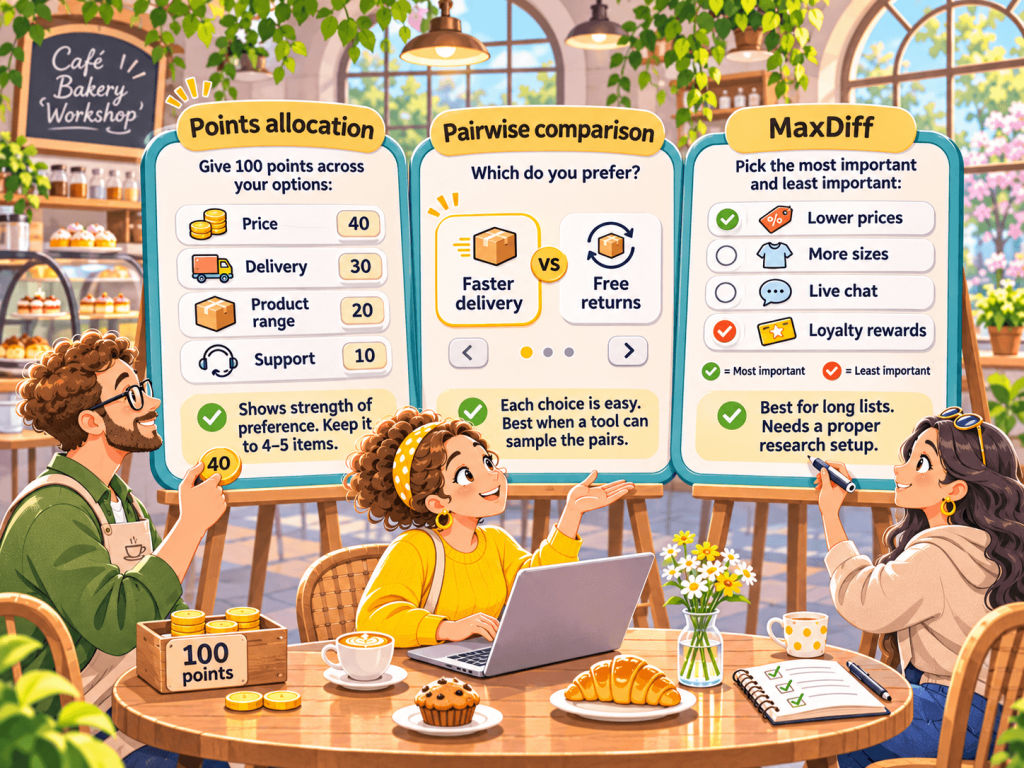
Respondents split a fixed budget, usually 100 points, across the options.
Spread 100 points across what matters most: Price ___ · Delivery speed ___ · Product range ___ · Customer service ___
It’s the simplest ranking-style format that captures strength of preference: a 70/10/10/10 split and a 30/25/25/20 split give the same order but tell different stories. The cost is mental arithmetic, so keep it to four or five items.
Pairwise comparison
Two options, pick one, repeat.
Which matters more to you? ◯ Faster delivery ◯ Free returns
Each choice is easy. The problem is volume: six items make 15 pairs. It works best in a research tool that samples the pairs for you.
MaxDiff (best-worst scaling)
MaxDiff shows four or five items at a time and asks for the most and least important, across many sets. It’s built for lists of 10 or more and needs a dedicated research tool plus a proper experimental design, so treat it as a project of its own.
Ranking vs. rating: when to use which
Here’s how the two compare on the points that decide which to use:
| Ranking | Rating | |
|---|---|---|
| Measures | Relative order | Intensity of each item |
| Data | Ordinal, items depend on each other | Each item scored independently |
| Effort | Grows quickly per added item | Roughly constant per item |
| Best for | Prioritizing a short list | Tracking satisfaction over time |
The clearest summary is a paper in Survey Research Methods by Moors, Vriens, Gelissen and Vermunt. Reviewing earlier work, they call ranking “a more cognitive demanding task for the respondents compared to the rating approach, more time-consuming, and less easy to statistically analyze.” The same review credits ranking with higher test-retest reliability in earlier studies, and notes it rules out straight-lining (rating everything the same) by design.
Their own result should cool anyone who thinks ranking is the only honest format: “ranking and ratings do produce results that are more similar than often thought.”
The working rule: need intensity, or a number you’ll track quarter over quarter? Use rating scales, often a 5-point Likert scale. Need a forced order of a short list you’ll act on? Rank.
When not to use a ranking question
Long lists come first. Ranking N items implies N×(N−1)/2 pairwise judgments, and that number runs away fast:
| Items to rank | Implied comparisons |
|---|---|
| 4 | 6 |
| 5 | 10 |
| 7 | 21 |
| 10 | 45 |
That curve explains why most advice lands somewhere between three and ten items, and why the sensible middle sits at five to seven. Beyond that, use top-N or MaxDiff.
Skip it for things people haven’t experienced. Moors and colleagues note that a hard ranking task can push respondents into arbitrary choices, so a first-time buyer ranking your returns process is guessing.
Don’t rank when the real question is “how much”. A ranking can’t say whether the top fix matters far more than the second, or barely more.
Don’t stack them. One per survey, two at most, or you’re on a quick route to survey fatigue.
And keep them off always-on transactional surveys. A post-purchase or post-ticket survey works because it takes seconds: a score, a reason, done.
Ranking question examples
Here are eighteen examples by team. Assume “1 = most important” unless stated otherwise, and shuffle the item order when you send.
Ecommerce
- Rank what would most improve your next order: ⇅ Faster delivery ⇅ Easier returns ⇅ Lower price ⇅ Live chat
- What would bring you back for a second purchase? ⇅ Loyalty points ⇅ Lower free-shipping threshold ⇅ New arrivals ⇅ Personal recommendations
- What mattered most when you chose to buy from us? ⇅ Price ⇅ Reviews ⇅ Delivery estimate ⇅ Return policy
- Rank the delivery options you’d pay extra for: ⇅ Next-day ⇅ Named-day ⇅ Evening slot ⇅ Carbon-neutral
B2B SaaS product and roadmap
- Which should we build next? ⇅ Custom dashboards ⇅ Salesforce sync ⇅ Role-based permissions ⇅ Webhooks
- Which integration would save your team the most time? ⇅ HubSpot ⇅ Slack ⇅ Zendesk ⇅ Microsoft Teams
- Rank these onboarding steps from hardest (1) to easiest (4): ⇅ Importing contacts ⇅ Building a first survey ⇅ Inviting teammates ⇅ Connecting an integration
- Pick and rank your top 3 roadmap themes: (Reporting · Automation · Integrations · Permissions · Mobile · Templates)
Customer support
- What matters most when you contact support? ⇅ Fast first reply ⇅ Solved in one contact ⇅ Friendly tone ⇅ Choice of channel
- Rank how you’d prefer to reach us: ⇅ Live chat ⇅ Email ⇅ Phone ⇅ Help center
- On this ticket, rank what we did best / Thinking about your recent contact with support, rank what we do best: ⇅ Understood the problem ⇅ Kept you updated ⇅ Fixed it fast ⇅ Explained next steps
- What would make you try self-service first? ⇅ Better search ⇅ Video guides ⇅ Step-by-step articles ⇅ In-app tips
Pricing and packaging
- Rank which features you’d pay for first: ⇅ Extra users ⇅ Advanced reports ⇅ Priority support ⇅ API access
- Split 100 points across what matters most in a plan: Price ___ · Contract flexibility ___ · Included seats ___ · Support level ___
- Pick and rank your top 3 add-ons: (SSO · Extra storage · Dedicated manager · Custom domain · Audit log · Sandbox)
Brand and marketing
- What made you choose us over the alternatives? ⇅ Price ⇅ A friend’s recommendation ⇅ Online reviews ⇅ Product range
- Where would you rather hear about new products? ⇅ Email ⇅ Instagram ⇅ SMS ⇅ In store
- Rank the words that best describe us: ⇅ Reliable ⇅ Affordable ⇅ Innovative ⇅ Friendly
How to score ranking results (worked example)
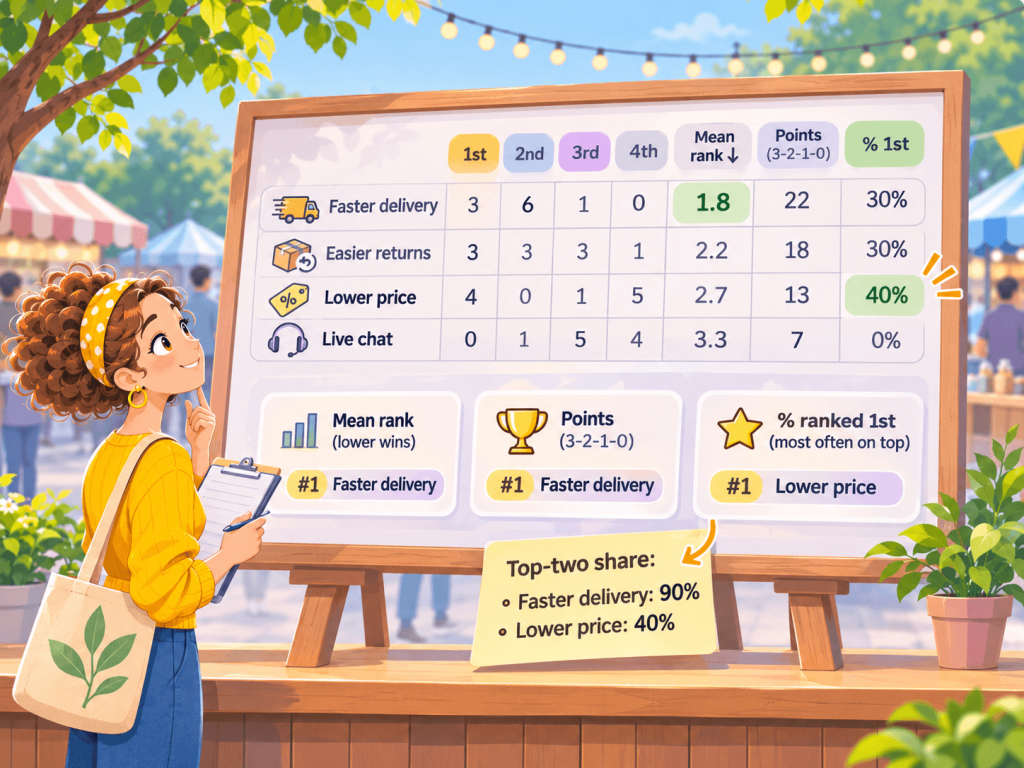
Here are ten made-up responses to show the arithmetic, illustrative rather than real survey data, for the first ecommerce example: “Rank what would most improve your next order (1 = most important).”
| Item | Ranked 1st | 2nd | 3rd | 4th | Mean rank (lower = better) | Points (3-2-1-0) | % ranked 1st |
|---|---|---|---|---|---|---|---|
| Faster delivery | 3 | 6 | 1 | 0 | 1.8 | 22 | 30% |
| Easier returns | 3 | 3 | 3 | 1 | 2.2 | 18 | 30% |
| Lower price | 4 | 0 | 1 | 5 | 2.7 | 13 | 40% |
| Live chat | 0 | 1 | 5 | 4 | 3.3 | 7 | 0% |
Mean rank averages each item’s position, and lower wins. Faster delivery takes it at 1.8.
Points, a Borda count, give each item the number of items minus its rank, so first earns 3 and last earns 0. Faster delivery wins again with 22.
First-place share counts how often an item came top. Now lower price wins at 40%, after finishing third on both other methods.
Five of the ten respondents ranked price dead last. It’s either the whole story or no story at all. Top-two share shows the split starkly: faster delivery lands in the top two for 90% of people, lower price for 40%.
Watch the direction, too. Some tools report a weighted “average ranking” that gives first place the highest weight (4-3-2-1 here), so higher wins: faster delivery scores 3.2, live chat 1.7. Check which one your tool shows.
So pick your scoring method before you look, or you’ll pick whichever one confirms the hunch. And treat a split item as a segment to cut, not a number to average. Who ranks price first: new customers, discount-code users, small baskets? Ask them why with an open-ended follow-up.
One caveat: ranks within a response aren’t independent, since moving one item up pushes another down. Researchers call this ipsative data, and it’s why the Moors review flags rankings as harder to analyze. For most CX decisions, mean rank, first-place share and a segment cut are plenty.
Best practices for writing ranking questions
Check each ranking question against this list before it goes out:
- Five to seven items. Above that, switch to top-N.
- Comparable items of one kind. Ranking “price” against “our mobile app” produces noise.
- Randomized order. Respondents in self-administered surveys favor items near the top of a list, a primacy effect that leads Pew Research Center to randomize answer options.
- Say which end is 1 in the question text itself.
- An exit for the unfamiliar. Offer “haven’t used this,” or use top-N.
- A phone test. Drag the list with your thumb first.
A ranking question is heavy, so place it after a couple of easy openers. If you’re building a customer feedback questionnaire around one, give it a single clear purpose and cut anything that competes with it.
Where ranking fits in a CX program
Ranking is a research instrument you pull out occasionally: a roadmap prioritization round, a pricing study, a quarterly “what should we fix first?” pulse. Your CX metrics are the always-on signal.
NPS, CSAT, or CES with an open-ended “why” tells you continuously where the friction is. An occasional ranking question, run in whichever research tool you use, tells you which fix to tackle first. That pairing is the backbone of feeding customer feedback into the product roadmap.
Inside an always-on Retently survey, the nearest native format is a single-select multiple-choice question, such as “Which of these would most improve your next order?” You get each respondent’s number one and nothing below it. Often that’s enough; when it isn’t, run a dedicated ranking study.
Put the list in order, then ask why
Rank when you have a short list, a real decision, and customers who’ve experienced every option. Score with a method chosen in advance, cut polarizing items by segment, and follow up with “why.”
For the always-on half, Retently runs NPS, CSAT and CES surveys with open-ended follow-ups, so you know where the friction is before you decide what to fix first. Start a free trial or book a demo.
Frequently Asked Questions
What is an example of a ranking question in a survey?
A typical example is “Rank what would most improve your next order, from 1 (most important) to 4,” listing faster delivery, easier returns, lower price and live chat. Respondents drag or number the items, and each gets a different position. The result shows priorities rather than separate scores, which suits roadmap and pricing decisions.
How many items should a ranking question have?
Five to seven items is the practical range. Effort grows with the implied comparisons: four items mean 6, seven mean 21, ten mean 45, and harder tasks invite arbitrary choices lower down. For longer lists, ask people to rank only their top three, or use MaxDiff in a research tool.
How do you analyze ranking question data?
Choose a method before you look. Mean rank averages each item’s position, and the lowest wins. Points (a Borda count) reward higher positions, and the highest total wins. First-place share counts how often an item came top. Methods can disagree on a polarizing item, so compare two and segment whoever ranks it first.
What is the difference between ranking and rating questions?
A ranking question orders items against each other, so only one can come first. A rating question scores each item on its own scale, so several can score high. Ranking shows relative priority; rating shows intensity and is faster. Research finds their results more similar than often assumed, so choose by the decision you need to make.

 Alex Bitca


 Christina Sol