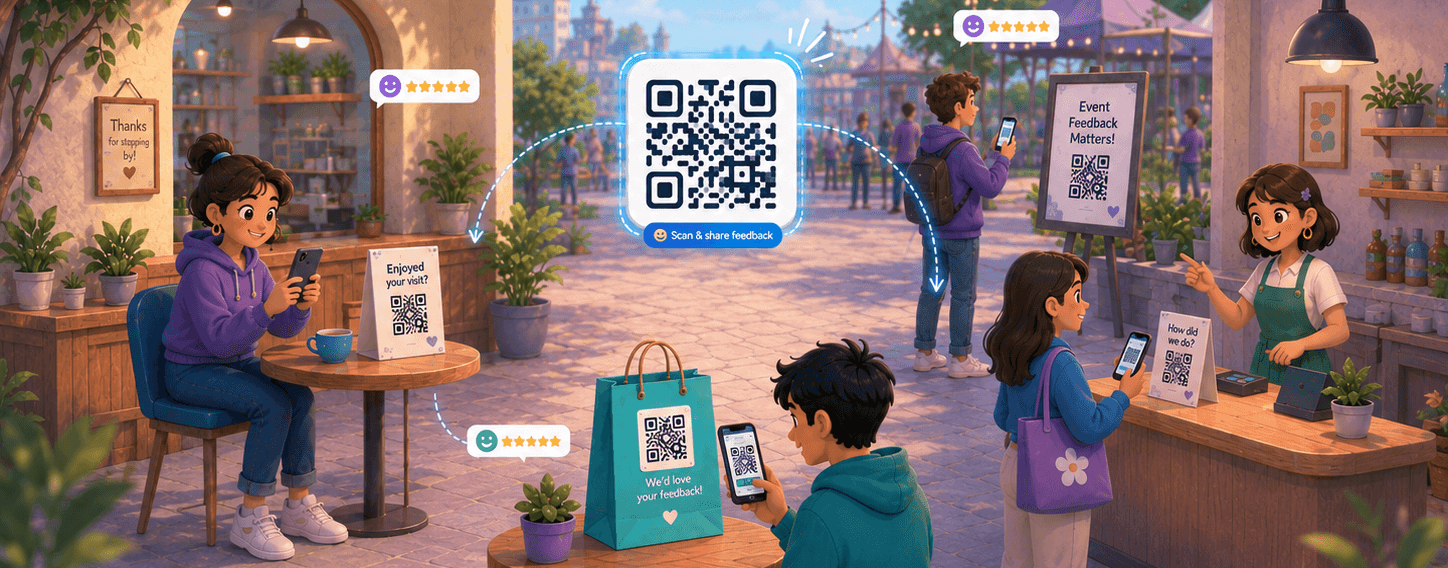



The best feedback usually arrives while the product is still in someone’s hands. A shopper slices the tape on a box, a diner waits for the check, an attendee sits through the last slide, and in that exact moment, they have an opinion worth capturing. A QR code survey is how you catch it. They scan the code, the survey opens on their phone, and you get an answer before the moment fades.
That is the whole idea. A QR code survey is a link survey with a physical trigger. Instead of emailing a link and hoping it gets opened, you print the link as a scannable code and put it where the experience actually happens: the packaging, the receipt, the table, the badge, the invoice. QR scanning is not a niche behavior either. An estimated 89 million US smartphone users scanned a code in 2022, up 26% from 2020.
This guide covers where to put codes by business type (we lead with ecommerce, as it is often overlooked), what to ask, how to design one people scan, how to measure it without kidding yourself, and how to set one up in Retently.
Key Takeaways
- A QR code survey is a link survey with a physical trigger. The scan opens a hosted survey on the customer’s phone, with no app and no login, so it works anywhere the experience happens.
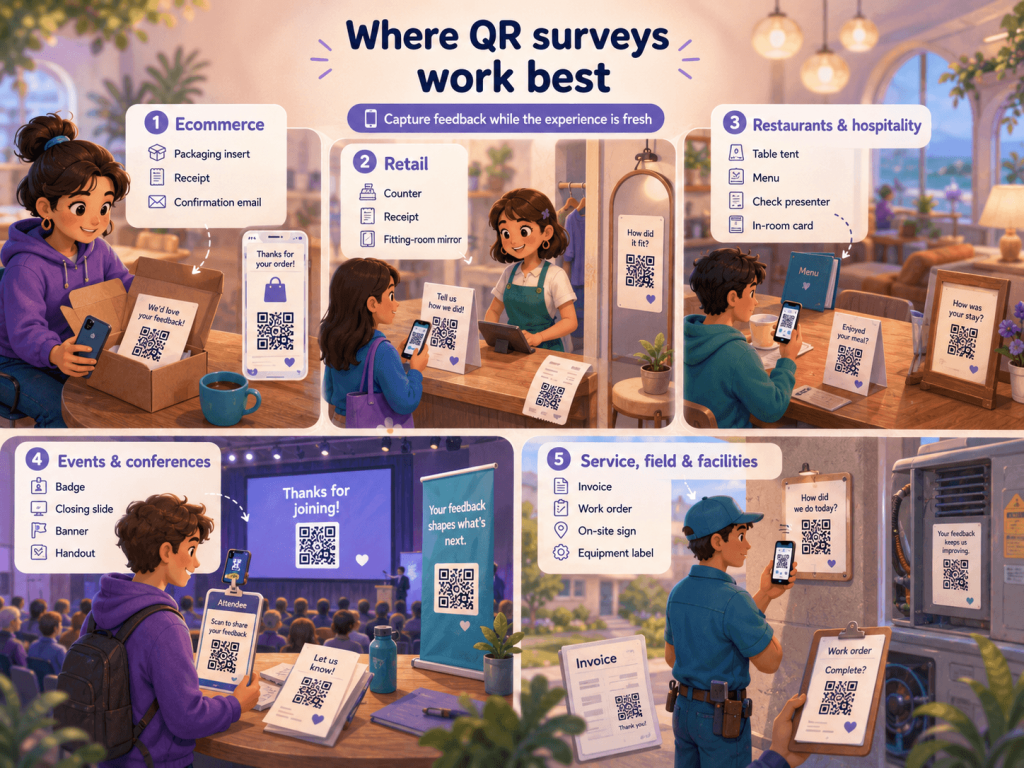
- Placement is the whole game. Lead with the moment feedback is freshest: the packaging insert for ecommerce, the receipt or counter for retail, the table for restaurants, the badge or slide for events, the invoice for services.
- Keep it to one metric plus one open question, and match the question to the placement.
- Design for the scan: size for distance, protect the quiet zone, say what happens on scan, go mobile-first, and test on real devices before printing.
- Give each placement its own link so you can attribute responses. And read the numbers honestly: once opened, link surveys complete at a median of about 90% in our data, but scanning is voluntary, so responses skew to the very happy and the very unhappy.
How a QR code survey actually works
Three steps, and none of them ask much of the customer. You generate a QR code that points to a hosted survey link. You print or display that code somewhere physical. The customer scans it with their phone camera, the survey loads in their browser, and they answer on their own device. No app to install, no account to create, no login screen.
Because the survey lives at a normal web link, everything you already know about hosted surveys applies. The code is just the delivery method, the same way an email or a website pop-up is. If you are weighing QR against your other options, our breakdown of email, SMS or pop-up channels covers the full channel mix; QR is the offline-to-online bridge in that lineup.
Picture a coffee roaster shipping a subscription bag. A card in the box reads “Scan to tell us how this roast landed.” The customer scans while grinding the first batch, taps a rating, and the roaster learns which beans to reorder before the bag is half gone. Same survey you would send by email, but the timing does the work.
One framing to keep: the scan is the “open,” and it is voluntary. That single fact shapes both where you place codes and how you read the numbers later.
Where to put QR surveys, by business type
A QR code is only as good as the moment it interrupts. Put it where the experience is fresh and the phone is already in reach. Here is where each business type gets the most honest answers, and what to ask at each.
Ecommerce: packaging inserts and receipts
This is the placement most articles skip, and it is the strongest one for online brands. Print a small card inside the box with a code that opens a two-question survey, and the customer scans it during the unboxing, when the product is literally in their hands. Our guide to packaging insert feedback covers the wider unboxing playbook; for feedback, the insert is the moment. It also beats the automated post-purchase email on timing, reaching the customer at peak enthusiasm instead of days later in a crowded inbox. Ask how the order landed, plus one open question about what almost stopped them from buying. The packing slip and confirmation email are backups for anyone who recycles the insert first.
Retail: counter, receipts, fitting rooms
Physical stores have the shortest gap between experience and phone. A code at the register, on the receipt, or on a fitting-room mirror catches the visit while the customer is still deciding whether to come back. Keep the counter version to a single rating so no queue builds behind it. One receipt-specific catch: thermal paper fades within weeks, especially in a hot car or wallet, so a code that scans perfectly off the printer can be unreadable by the time someone gets around to it. For the deeper point-of-sale and per-store reporting side, see our piece on collecting feedback at the register.
Restaurants and hospitality
Table tents, the bottom of the menu, and the check present all work because diners are already sitting with their phones out. Time the ask to after the meal, not before, so you measure the experience and not the anticipation. A quick “how was your meal” rating plus one line on what they would change is plenty. Hotels can do the same on the in-room card. In tourist-heavy or multilingual markets, make sure the survey itself detects the guest’s language or offers alternatives – a code that only opens in English undoes the goodwill of asking in the first place.
Events and conferences
Badges, closing slides, banners, and handouts all carry a code well, since attendees expect to scan things at events anyway. A code on the final slide of a talk collects reactions while the session is still in the room. For the questions themselves, our list of post-event surveys covers sessions, logistics, and intent to return.
Service, field, and facilities
Invoices, work-order paperwork, on-site signage, and equipment labels all give a service business a natural place to ask. A code on the invoice reaches the customer right after the job, when they have a clear view of whether it went well. A code on a facility sign catches issues in the moment they happen, which is exactly when people are motivated to report them.
What to ask at each placement
Keep it short. A scanned survey competes with everything else the person could do with their phone, so the rule is one metric plus one open question, rarely more. The metric gives you a trend line; the open question tells you why it moved.
Match the question to the moment. A few micro-templates that work:
- Packaging insert: “How happy are you with your order?” (1 to 5) and “Anything we could have done better?”
- Receipt or counter: “How likely are you to recommend us?” (0 to 10 NPS) and “What is the one thing we could improve?”
- Restaurant table tent: “How was your meal today?” (emoji or 1 to 5) and “What would you change?”
- Event slide: “Was this session worth your time?” and “What topic should we cover next?”
- Service invoice: “How did the job go?” (1 to 5) and “What could we have done better?”
You do not need to reinvent question design for a QR code; the same principles apply as in any survey. If you want to go deeper on structure and wording, our reference on survey question types covers which formats fit a small space and which to avoid when you get one screen of attention.
Designing a QR code people actually scan
A code that does not scan collects nothing, and a lot of printed codes quietly fail. A few practicals keep yours working:
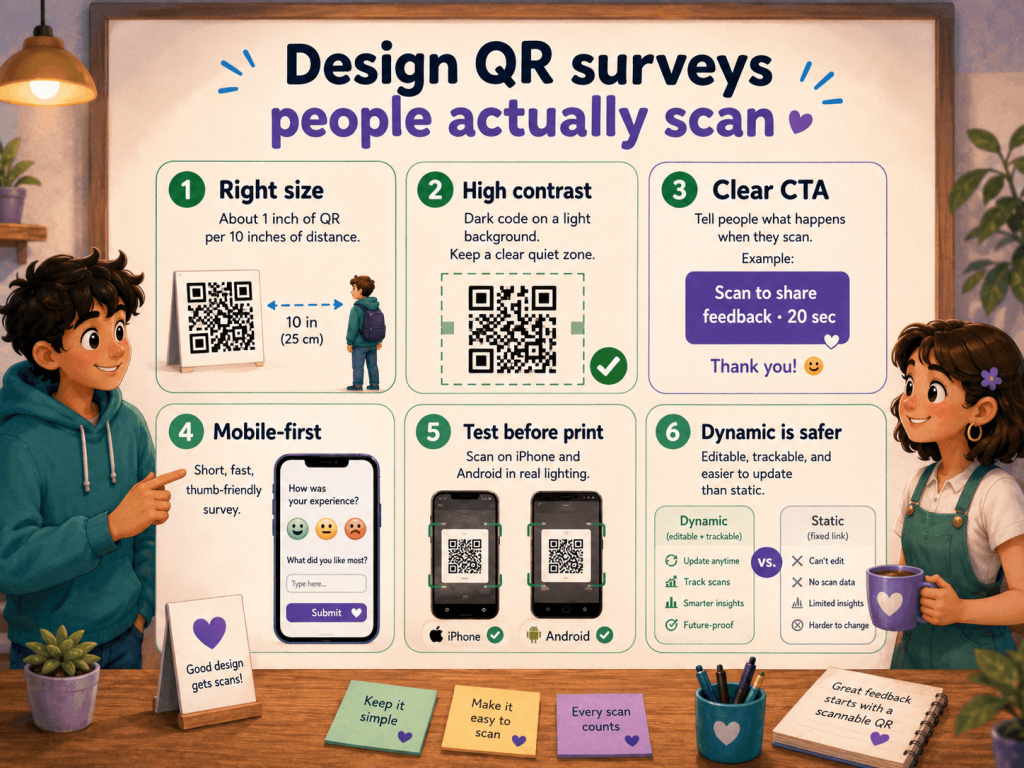
- Size for the scan distance. A rough rule is one inch of code for every ten inches of scanning distance. A table tent can be small; a code on a poster across the room cannot.
- Keep contrast high and the quiet zone clear. Dark code on a light background scans best, and the blank margin around it (the “quiet zone”) needs to stay empty. Codes crammed to the edge of a design fail more than any other reason.
- Say what happens when they scan. “Scan to tell us how we did, takes 20 seconds” beats a bare code. People scan when they know the payoff and the cost. A clear label also builds trust: with QR-based scams on the rise, people are more cautious about codes that don’t say where they lead. A branded or dynamic link (see below) helps here too, since it resolves to a recognizable domain instead of a raw redirect.
- Make the survey mobile-first. It loads on a phone, so it has to be thumb-friendly, fast, and short. A desktop-shaped survey on a small screen loses people.
- Test on real devices before you print. Scan the proof with an iPhone and an Android, in the actual lighting. A code that works on your monitor can fail on matte packaging.
- Go easy on customization. A logo in the center is fine if you keep it small and raise the error-correction level so the code still reads. Heavy recoloring and gradients are where scannability quietly dies.
One choice matters more than the rest: static versus dynamic. A static code hard-codes the destination, so if the link ever changes, every printed copy is dead. A dynamic code points to a redirect you control, so you can repoint it later and usually track scans too. For anything printed in volume or meant to last, dynamic is the safer call.
Measuring QR survey performance
Several things separate a QR program you can learn from and a pile of anonymous responses.
The first is attribution. Give each placement its own distinct link or UTM tag so that a receipt code, a packaging code, and a table tent code report separately. Without it, you get feedback but no idea which touchpoint produced it. This is the floor, not an advanced move. If a placement pulls scans but few finished responses, that usually means the survey is too long for the setting, not that the code is at fault.
The second is reading the numbers honestly, which is where most published advice goes vague. Every guide claims QR codes “boost response rates” and none puts a real figure next to it. Here is one from our own data: across Retently accounts over the trailing 12 months, once a link survey is opened, it is completed at a median of roughly 90%. Read that precisely, because it is completion once the survey is open, not the share of people who see a code and respond. A QR survey is a link survey, so the same completion behavior applies after the scan; what a code cannot promise you is the scan itself.
That leads to the caveat nobody prints. People who scan a code choose to, and that self-selection skews answers toward the very happy and the very annoyed, with the quietly satisfied middle underrepresented. So read the trend for each placement over time rather than trusting a single average, and treat QR as one input among your channels. To lift the share of scans that turn into finished responses, our tips to improve the response rate apply directly.
How to set up a QR code survey in Retently
You do not need a separate QR generator for this. The setup is a link survey plus its code.
Start by building a link survey and choosing how it collects. You can run it anonymously, where responses come in with personal identifiers stripped, or identified, if you want to tie feedback back to a specific customer. For a code on public packaging or a shared sign, anonymous is usually the right default.
From there, the survey’s share options include a downloadable QR code image, which you can drop straight into a print file. The code is generated deterministically, so printed copies keep resolving to the same survey rather than breaking on a redeploy. For a shared tablet at a counter, there is a kiosk mode that resets to the first page after each response and loops the thank-you screen, so one device can take answers all day without a staff member babysitting it.
For per-location reporting, you can append parameters to the link, such as a store or region tag, and they are saved as response properties you can filter on later. That is how you compare Store 42 against Store 17 from one base survey.
One honest limitation to plan around: the built-in QR image encodes the bare campaign URL, which is what keeps printed copies stable. So if you want a distinct code per location, each carrying its own store tag, you add that parameter to the link and encode that version yourself with any QR generator. The native code is perfect for one universal survey; per-placement codes are a small extra step. When you are ready to print, confirm the exact labels and flow in your account, since interface wording changes over time.
QR is not the only always-on channel
A QR code is one way to make a survey ambient, waiting in the physical world to be scanned. It is not the only one. Email signature surveys turn every message your team sends into a passive collection point, which suits support and account teams already in constant contact. Website and in-app surveys catch people mid-session the same way a QR catches them in a store.
No single channel sees everything. A QR reaches the person holding your product; a signature survey reaches the person reading your email; a pop-up reaches the person on your site. Most survey platforms, Retently included, generate the QR code for you, so a standalone generator is rarely worth setting up on its own. Pick the channels that match where your customers are, and let the QR cover the offline moments.
Wrapping Up
QR codes turn a moment your customer is already living through into feedback you can act on, without waiting for an inbox. Retently generates the code, hosts the survey, and reports the responses in one place, so you can put a code on a box today and read the answers tomorrow. Start a free trial to build your first one, or book a demo to see the setup end-to-end.
Frequently Asked Questions
What if someone can’t scan the QR code? Always print the survey link as text next to the code, or a short branded URL people can type. Some phones have older cameras, some have scanning disabled, and some people just prefer typing. A visible fallback link means a scanning hiccup does not cost you the response, and it costs nothing to add.
How many questions should a QR code survey have? Fewer than you think. One rating or NPS question plus one optional open-ended question is the sweet spot, because the person is standing in a store or holding a box, not sitting at a desk. If you need more depth, ask the short version at the code and follow up by email with anyone who opts in.
Are QR code survey responses anonymous? They can be either. An anonymous link collects answers without tying them to a named person, which suits codes on public packaging or signage. An identified link connects the response to a specific customer, which suits a code sent to a known contact. Choose based on the placement and what you are allowed to collect, and tell respondents which one it is.
How do I track which placement or location performs best? Give every placement its own distinct link or UTM tag, and, if your tool supports it, append a location parameter so each store reports separately. That way, a receipt code, a packaging code, and a counter code show up as different sources, and you compare completed responses per placement instead of guessing.
Static vs dynamic QR code: which should I use for a survey? Dynamic, for almost any survey you print in volume or expect to last. A static code bakes the link in permanently, so if the survey URL ever changes, every printed copy dies. A dynamic code points to a redirect you control, so you can repoint it later and usually track scans. Static is fine only for a one-off, short-lived print.
Is there a free QR code survey generator? Usually, you do not need a separate one. Most survey platforms generate a downloadable QR code for any survey link as a built-in feature, so the code and survey come from the same place and stay in sync. A standalone generator only makes sense if you are pointing a code at a link your survey tool did not create.

 Christina Sol